
- OCR overlay now opens faster on slower PCs - the background screenshot is prepared at a lower resolution, which reduces CPU time before you can start selecting the tooltip.
- HTTP connections to the server are now reused between scans, eliminating a reconnect step that added latency on every OCR request.
Home/Companion App
stash.trade Companion App
Manual screenshot OCR app for stash.trade listings. Windows · Diablo IV · No game modification.
Beta · v0.5.2
List items faster, without alt-tabbing
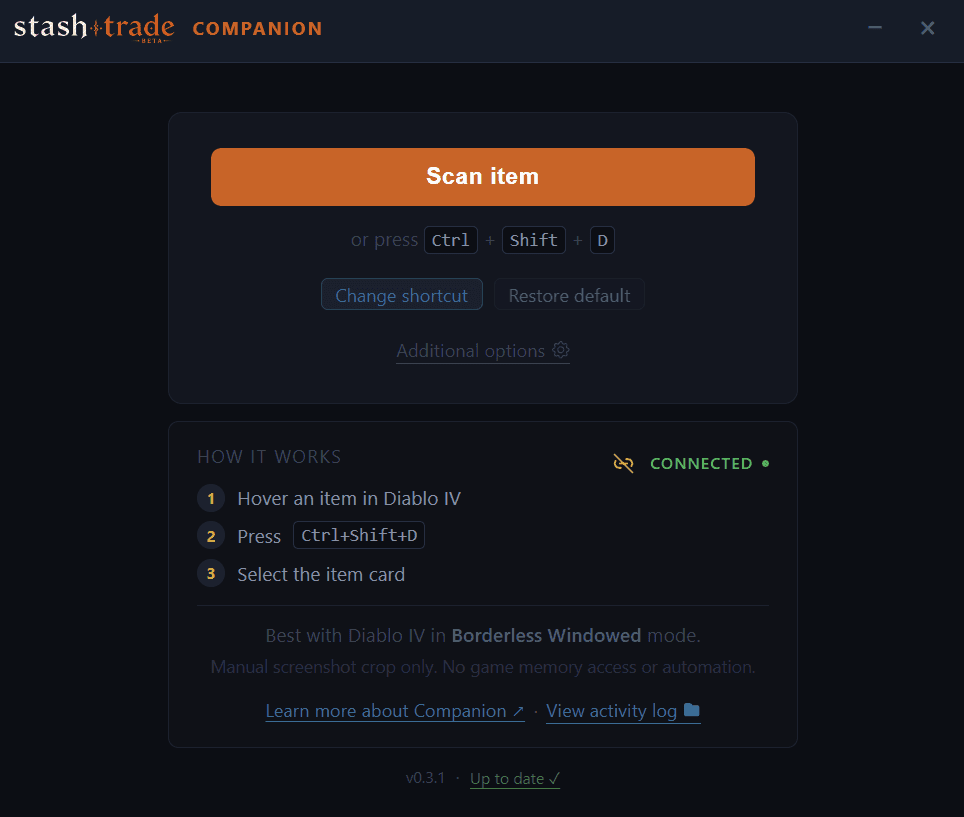
Press a hotkey, drag a rectangle over an item tooltip, and the Companion App sends the crop to stash.trade for OCR. Review the parsed item, tweak anything that needs tweaking, publish.
It is a manual tool. It does not modify the game, read its memory, or automate any action - designed to stay out of the way of how the game is meant to be played.
Prefer no install? Download portable ZIP (advanced)
0/68 AV detections on VirusTotal (portable) · SHA256 published below
List without alt-tabbing
How it works
Four steps from tooltip to published listing. You stay in control at every step.
1
Press the hotkey
Hover an item tooltip in Diablo IV (Borderless Windowed) and press Ctrl+Shift+D, or your custom shortcut.
2
Select the tooltip
Drag a rectangle over just the tooltip area. Nothing is captured until you release the mouse.
3
Review the OCR result
stash.trade reads the crop and shows you the parsed item. You can edit anything before publishing.
4
Publish the listing
One click and the listing goes live on stash.trade. Or close the preview without publishing - nothing is saved.
Safety model
Built to avoid game-client interaction
The Companion App is a manual screenshot OCR tool - not a mod, addon, or bot. It captures only what you select, only when you tell it to.
What it does NOT do
- Read Diablo IV process memory
- Inject DLLs into the game
- Hook DirectX, Vulkan, or any rendering API
- Inspect or modify network traffic
- Automate keyboard, mouse, or in-game actions
- Auto-trade or auto-list anything
- Touch your Battle.net password
What it actually does
- Captures a screen region only after you press the hotkey AND drag a selection
- Uploads only the cropped image to stash.trade /api/ocr - never the full screen
- Stores your stash.trade login token in Windows Credential Manager (OS keyring)
- Writes a local activity log without tokens, screenshots, or item payloads
- Lets you review every listing before it is published
We cannot guarantee enforcement decisions made by game publishers. The Companion App is designed as a manual screenshot OCR tool with no client interaction, but you use it at your own discretion. Always run Diablo IV in Borderless Windowed mode for the best compatibility.
Privacy & account
You never type your stash.trade or Battle.net password into the Companion App. The app opens stash.trade in your browser, you approve the connection there, and the app receives a limited token used only for OCR and listing actions.
The token is stored in Windows Credential Manager (OS keyring), not in a plain file. Sign out from inside the app at any time - that removes the token from the keyring.
Activity logs are local to your machine and never leave it. They do not contain tokens, screenshots, base64 data, or OCR payloads - only short event lines for diagnostics. Logs rotate at 5 MB.
Download
Beta v0.5.2
Windows 10 / 11 (x64) · Microsoft Edge WebView2 runtime
RecommendedOne-click install + auto-update
Installer (.exe)
Installs under Program Files. In-app updater applies a signed NSIS update automatically when a new version ships.
Download installer v0.5.2- SHA256 (setup.exe)8f758b54e97fb0f0f4d52bae273176be956cd09e44c2a063585b4bfd79782d26
AdvancedNo install · runs from any folder
Portable (.zip)
Extract anywhere and run. The in-app updater swaps the exe in place (SHA256-verified). Pick this if you don't want a Program Files install.
Download portable v0.5.2- SHA256 (portable.zip)b15ba619dba97a8549678521463d1d41bd5bdc604b12006899a9571275bde2a2
- VirusTotal0/68 detections
Windows SmartScreen may warn you
Because stash.trade Companion is still an unsigned beta, Windows may show "Windows protected your PC" on first launch. This is common for new apps that do not yet have publisher reputation - it applies to both the installer and the portable download.
How to run it
- Click More info
- Click Run anyway
Before running
- Download only from stash.trade
- Compare the SHA256 checksum (above)
- Check the VirusTotal report
This warning does not mean the app was detected as malware - it means Windows does not yet recognize this unsigned beta build. Future signed builds should reduce these warnings as publisher reputation builds.
FAQ
Quick answers to the questions we hear most often.
Is this a bot or auto-trader?
No. The Companion App only acts when you press a hotkey and drag a selection. Every listing is reviewed and published manually by you.
Does it read game memory or inject anything?
No. It uses the standard Windows screen-capture API for the area you select. It never opens a handle to the Diablo IV process, never injects code, and never hooks the renderer or input.
Will it work in fullscreen?
Borderless Windowed (Windowed Fullscreen) is recommended. Classic Fullscreen Exclusive can block the global hotkey and the screen capture in some driver/GPU configurations.
Why does Windows show a SmartScreen warning?
The beta build is not yet code-signed. SmartScreen warns about any unsigned executable until the publisher builds reputation. Click "More info" → "Run anyway". Code signing is planned for the public release.
How do I uninstall it?
Quit from the tray icon, then delete the unzipped folder. To clear the saved login token, open Windows Credential Manager → Windows Credentials → remove the "stash-trade-companion" entry.
Where are the activity logs?
%APPDATA%\stash.trade.companion\logs\companion.log - open them from the app footer ("View activity log"). Logs rotate at 5 MB to companion.old.log.
Can I revoke the Companion App's access to my account?
Yes. Sign out from inside the app, or remove the entry from Windows Credential Manager. Account-side revocation from stash.trade settings is on the roadmap.
Changelog
Full site changelog- UI scale setting: choose from 50% to 200% or leave it on Auto - the app picks the right size for your screen (1080p, 1440p, 4K) automatically. Available in Additional Options.
- Changing the scale now also resizes the window correctly in both directions, including when switching back to Auto from a larger setting.
The first public beta of stash.trade Companion App. Press a hotkey, drag over an item tooltip, get a filled listing - without alt-tabbing. Everything you need to list items from inside Diablo IV.
Hotkey capture
Hover any item tooltip in Diablo IV and press a hotkey - the app opens an overlay instantly. No alt-tab, no window switching.
Drag-to-select
Draw a rectangle over just the tooltip. Nothing is captured until you release the mouse - you stay in full control.
Instant OCR
stash.trade reads the crop and fills in the item name, affixes, rarity and power. Review and publish in seconds.
Auto-updater
New versions install with one click from inside the app. No need to visit the website or download anything manually.
Portable or installed
Run from a ZIP folder with no install, or use the standard installer. Both options include in-app updates.
Secure login
Your stash.trade session is stored in Windows Credential Manager - the OS keyring, not a plain text file.
4K-ready UI
The interface and overlay scale automatically for 1080p, 1440p and 4K screens, with a manual scale override in settings.
Custom hotkey
Change the capture shortcut to any key combination you prefer. Close-to-tray behaviour is also configurable.